
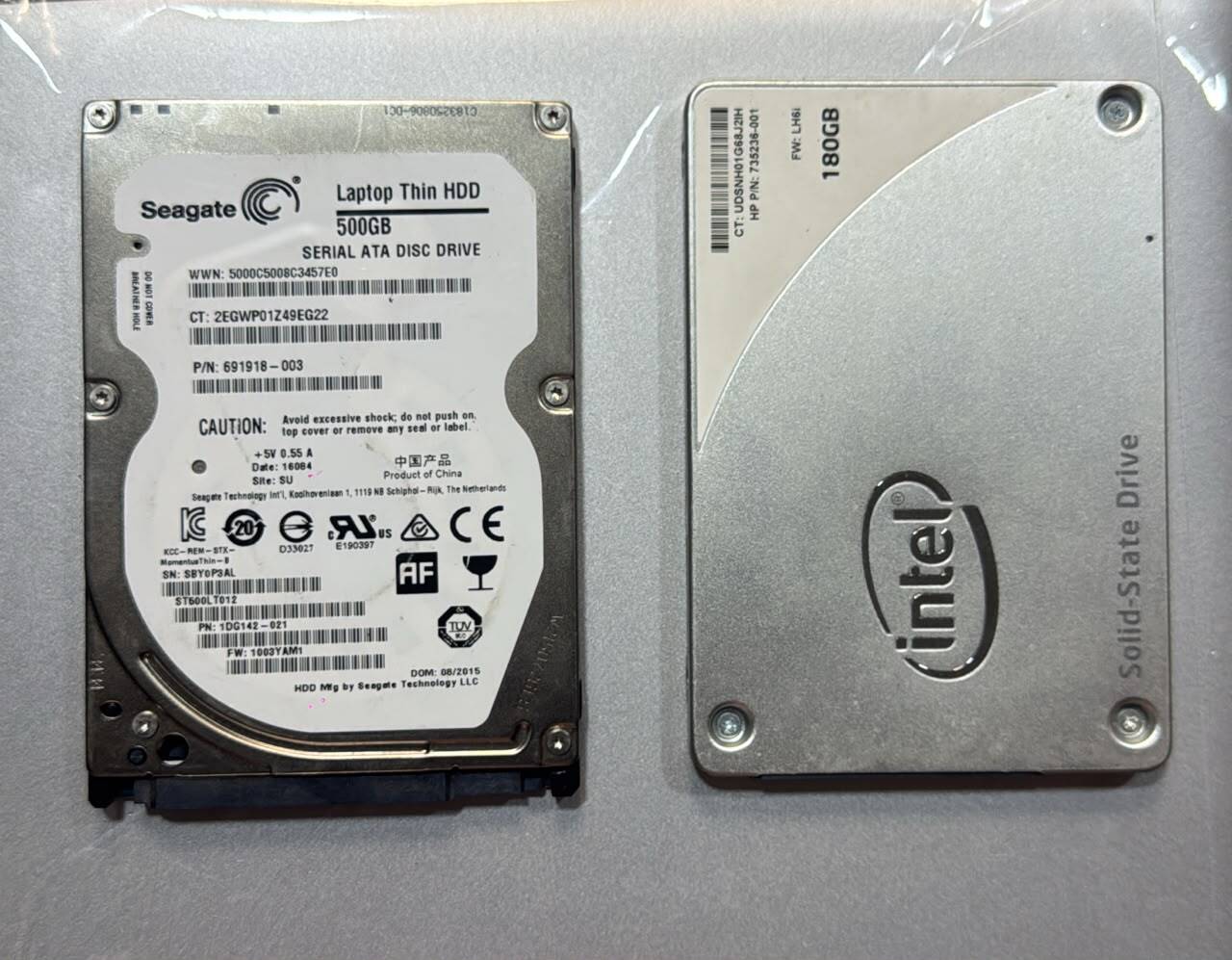
HDD vs SSD: What’s the difference and which one should you choose??
HDD vs SSD: What’s the Difference and Which One Should You Choose? If you’re shopping for a laptop or computer, you’ve probably come across terms like HDD and SSD. You may even have wondered: “What exactly is the difference, and does it really matter?” The short answer is yes, it matters a lot. Both HDDs…
HDD vs SSD: What’s the Difference and Which One Should You Choose?
If you’re shopping for a laptop or computer, you’ve probably come across terms like HDD and SSD. You may even have wondered:
“What exactly is the difference, and does it really matter?”
The short answer is yes, it matters a lot.
Both HDDs and SSDs are used to store your files, applications, photos, videos and operating system. However, they work very differently, and that difference can have a huge impact on how fast and responsive your laptop feels.
In this guide, we’ll break everything down in simple terms so you can understand HDD vs SSD, the advantages and disadvantages of each, and which one makes more sense when buying a laptop.
What Is an HDD?
HDD stands for Hard Disk Drive.
An HDD is an older type of storage device that uses spinning magnetic disks to store information. Inside an HDD, there are physical parts that move while the computer is reading or writing your files.
Think of an HDD like an old-fashioned record player.
The record spins, while a small arm moves across it to find the information you want.
Your computer does something similar with an HDD — except it’s storing digital information instead of music.
Why are HDDs still popular?
One major advantage of HDDs is storage capacity at a relatively low cost.
You can often find HDDs with large storage capacities, such as:
500GB
1TB
2TB
4TB and beyond
This makes them useful for people who need to store lots of large files without spending too much money.
What Is an SSD?
SSD stands for Solid State Drive.
Unlike an HDD, an SSD has no spinning disks or moving mechanical parts.
Instead, it uses electronic memory chips to store your information.
Think of an SSD more like a large, very fast memory card.
Because there are no moving parts, an SSD can access information much faster than a traditional HDD.
And this is where you start noticing the difference.
HDD vs SSD: What’s the Biggest Difference?
The biggest difference is speed.
An SSD can make a computer feel dramatically faster.
For example, when you turn on a laptop with an SSD, the computer can usually start up much more quickly than a similar machine running on a traditional HDD.
Applications can also open faster, files can load more quickly, and the computer generally feels more responsive.
Here’s a simple example:
Imagine you have two identical laptops.
Both have:
Intel Core i5 processor
8GB RAM
But one has a 500GB HDD and the other has a 256GB SSD.
Even though the processor and RAM are the same, the SSD-equipped laptop can feel significantly faster during everyday use.
That’s because storage affects many of the things you do every day.
Why Does an SSD Make a Laptop Feel Faster?
Your computer is constantly reading and writing information.
When you:
Start Windows
Open Chrome
Launch Microsoft Word
Open a large file
Install software
Search through files
Load applications
your computer needs to access information stored on the drive.
An SSD can retrieve that information much faster because it doesn’t have to wait for a physical disk to spin and a mechanical head to move.
The result?
Less waiting. More doing.
HDD vs SSD: A Simple Comparison
Feature HDD SSD
Speed Slower Much faster
Moving
parts Yes No
Durability More sensitive to physical shock Generally more resistant
Noise Can make some noise Silent
Power consumption Generally higher Generally lower
Weight Usually heavier Usually lighter
Price per GB Usually cheaper Usually more expensive
Best for Large, affordable storage Speed and everyday performance
Which One Is Better for a Laptop?
For most people buying a laptop today, an SSD is the better choice.
If you’re using your laptop for:
Office work
School
Browsing the internet
Zoom or Google Meet
Microsoft Office
Canva
Programming
Business
Content creation
Everyday productivity
an SSD will generally give you a much better experience.
You don’t necessarily need an enormous SSD either.
For many everyday users, 256GB or 512GB can be enough, depending on how much they store locally.
But Is an HDD Completely Useless?
Not at all.
HDDs still have their place.
If you need a lot of storage at a lower price, an HDD can make sense.
For example, someone who needs to store:
Movies
Large video files
Photos
Backups
Documents
Archives
may appreciate the large storage capacity HDDs can provide.
That’s why you may still see HDDs used in desktop computers, external storage devices and backup systems.
What About a Laptop With Both HDD and SSD?
This can actually be a very useful setup.
Some computers use an SSD for the operating system and frequently used applications, while using an HDD for larger files.
For example:
256GB SSD + 1TB HDD
The SSD can handle Windows and your main applications, giving you fast performance.
The 1TB HDD provides additional space for large files.
It’s essentially:
SSD = Speed
HDD = Storage
Does SSD Size Affect Speed?
This is something people often misunderstand.
A 512GB SSD isn’t automatically twice as fast as a 256GB SSD simply because it has twice the storage capacity.
Storage capacity and speed are two different things.
The actual performance depends on the type of SSD, the interface it uses, and other hardware factors.
So don’t assume:
“512GB means twice as fast as 256GB.”
It doesn’t work that way.
What About RAM and SSD?
Another common question is:
“If I have 16GB RAM, do I still need an SSD?”
Yes.
RAM and storage perform different jobs.
Think of it this way:
RAM = Your workspace
SSD/HDD = Your filing cabinet
RAM helps your computer handle multiple active tasks. Storage holds your operating system, applications and files even when the computer is turned off.
That’s why a laptop with:
8GB RAM + SSD
can sometimes feel much faster than one with:
16GB RAM + HDD
for everyday tasks.
The RAM is important, but the storage technology matters too.
Does an SSD Improve Gaming?
Yes, although there’s an important distinction.
An SSD generally won’t magically increase your game’s graphics performance or turn a weak graphics card into a powerful one.
However, it can significantly improve loading times.
Games can launch faster, levels can load more quickly, and waiting around between loading screens can be reduced.
For a gaming PC, it’s common to use an SSD for games and the operating system.
What About Video Editing and Content Creation?
If you’re working with video, photos or large creative projects, an SSD can make your workflow much more comfortable.
Large files can take time to load from slower storage.
An SSD can help with:
Opening projects
Loading files
Moving large files
Launching editing applications
Managing your working files
For serious content creators, however, storage is only one part of the equation. Your processor, RAM and graphics card also matter significantly.
Are SSDs More Reliable Than HDDs?
SSDs have an advantage because they don’t contain the same moving mechanical components found in HDDs.
That means they’re generally better suited to devices that are frequently moved around, such as laptops.
However, no storage device is guaranteed to last forever.
An SSD can fail.
An HDD can fail.
That’s why you should always keep important files backed up — regardless of which storage technology your laptop uses.
Should You Upgrade Your Old Laptop From HDD to SSD?
If your laptop currently has an HDD and supports an SSD upgrade, this can be one of the best upgrades you can make.
You may not need to replace the entire laptop.
Replacing an old HDD with an SSD can dramatically improve how responsive the computer feels.
You could potentially notice improvements in:
Startup time
Application loading
File access
General responsiveness
It’s one of those upgrades where the difference can be immediately noticeable.
So, Which Should You Buy?
Here’s our simple recommendation:
Choose an SSD if:
You want a laptop that feels fast, responsive and modern.
For most students, professionals, business owners and everyday users, SSD is the way to go.
Choose an HDD if:
Your priority is getting the most storage for your money, and you’re comfortable sacrificing some speed.
Choose both if:
You want fast performance and lots of storage and your computer supports a dual-drive setup.
The Bottom Line
If you’re buying a laptop and you have a choice between a similar machine with an HDD and one with an SSD, we would generally recommend the SSD.
You might have less storage capacity for the same amount of money, but the improvement in everyday responsiveness can be much more valuable.
After all, nobody enjoys sitting in front of a laptop waiting for it to boot, waiting for an application to open, or waiting for files to load.
Your laptop should work for you — not make you wait for it.
Looking for a Laptop?
At Magnum Dealz, we have a range of laptops for work, school, business, productivity, content creation and everyday use.
Whether you’re looking for a budget-friendly laptop, business laptop, gaming machine or premium device, we’re here to help you find something that fits your needs and budget.
📱 Looking for a laptop? Send us a DM.
Magnum Dealz — Committed to Quality! Committed to You!!